Vos Conky
Postez ici vos conkys ou des petits bouts et demandes d'aide.
Discussions Libres

Guygoye Membre non connecté
-

- Voir le profil du membre Guygoye
- Inscrit le : 25/10/2018
- Groupes :
-
Modérateur

-
Ambassadeur

-
Forgeron

Reprise du message précédent
Jybz :Ah oui ? Ce serait quoi de la programmation, si ce n'est une suite l'instruction pour produire un résultat déterminé ?


loutch Membre non connecté
-

- Voir le profil du membre loutch
- Inscrit le : 07/07/2010
- Groupes :
En 2016 depuis mageia 5 et conky 1.9 il m'a été impossible faire ceci .
radiotray et audacious avec impulse .
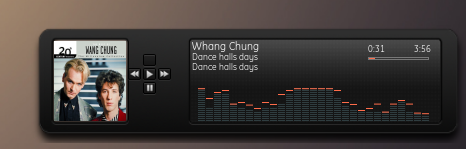
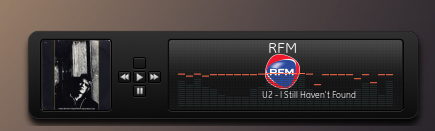
Aujourd'ui en 2025 enfin trouvé un truc qui fonctionne (pour le moment)
RadioTray_NG 2025

audacious 2025
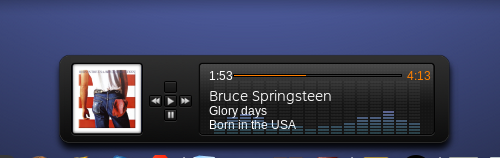
@+
Édité par loutch Le 16/02/2025 à 08h08
Linuxmint 24.02 Xia - Mageia 9 xfce et plasma sur ssd sur HP Pavilion g7
Xubuntu 18.04 LTS et 24.04 en xfce sur ASUS Rog STRIX
Xubuntu 18.04 LTS et 24.04 en xfce sur ASUS Rog STRIX
loutch Membre non connecté
-
- Voir le profil du membre loutch
- Inscrit le : 07/07/2010
- Groupes :
Linuxmint 24.02 Xia - Mageia 9 xfce et plasma sur ssd sur HP Pavilion g7
Xubuntu 18.04 LTS et 24.04 en xfce sur ASUS Rog STRIX
Xubuntu 18.04 LTS et 24.04 en xfce sur ASUS Rog STRIX

Ami age Membre non connecté
-
- Voir le profil du membre Ami age
- Inscrit le : 18/08/2012
- Site internet
- Groupes :
-
Modérateur
_______________________________________________________________________ 
___________________________________ Un petit clic pour Mageia ? =>> CLIQUEZ I C I :
.
___________________________________ Un petit clic pour Mageia ? =>> CLIQUEZ I C I :
.
loutch Membre non connecté
-
- Voir le profil du membre loutch
- Inscrit le : 07/07/2010
- Groupes :
Citation du site anglais traduite avec trans -brief (bon des fois c'est pas ça mais dans l'ensemble c'est bon )
Script
Code BASH :
#!/bin/bash

curl -s "https://www.calendarlabs.com/today/" | grep '<p>' | sed '3q;d' | sed 's/<p>//' | sed 's/<\/p>//' | sed 's/^[ \t]*//' > $HOME/.conky/Tahoe/citation/citation_en

 sed -n  '1p' $HOME/.conky/Tahoe/citation/citation_en | trans -brief :fr  > $HOME/.conky/Tahoe/citation/citation_fr

exit
Le conky doit être assez large surtout si c'est du Lao Tzu.
la partie après TEXT
Code TEXT :
${alignc}Citation du jour${execi 3600 ~/.conky/Tahoe/citation/traduction.sh}
${alignc}${texeci 600 sed -n '1p' $HOME/.conky/Tahoe/citation/citation_fr | fmt -w 140 | sed -n '1p'}
${alignc}${texeci 600 sed -n '1p' $HOME/.conky/Tahoe/citation/citation_fr | fmt -w 140 | sed -n '2p'}
${alignc}${texeci 600 sed -n '1p' $HOME/.conky/Tahoe/citation/citation_fr | fmt -w 140 | sed -n '3p'}
${alignc}${texeci 3600 curl -s "https://www.calendarlabs.com/today/" | grep '<strong>' | sed '2q;d' | sed 's/^[ \t]*//' | awk -F'</strong>' '{print $1}' | sed 's/<div class="quote-auth"><strong>//'}
Donne ceci

@+
Linuxmint 24.02 Xia - Mageia 9 xfce et plasma sur ssd sur HP Pavilion g7
Xubuntu 18.04 LTS et 24.04 en xfce sur ASUS Rog STRIX
Xubuntu 18.04 LTS et 24.04 en xfce sur ASUS Rog STRIX
loutch Membre non connecté
-
- Voir le profil du membre loutch
- Inscrit le : 07/07/2010
- Groupes :
@ Ami_age
12 ans et pratiquement 96 014 vues donc malgré le peu de nouveautés conky intéresse encore du monde .
La dernière version en cours
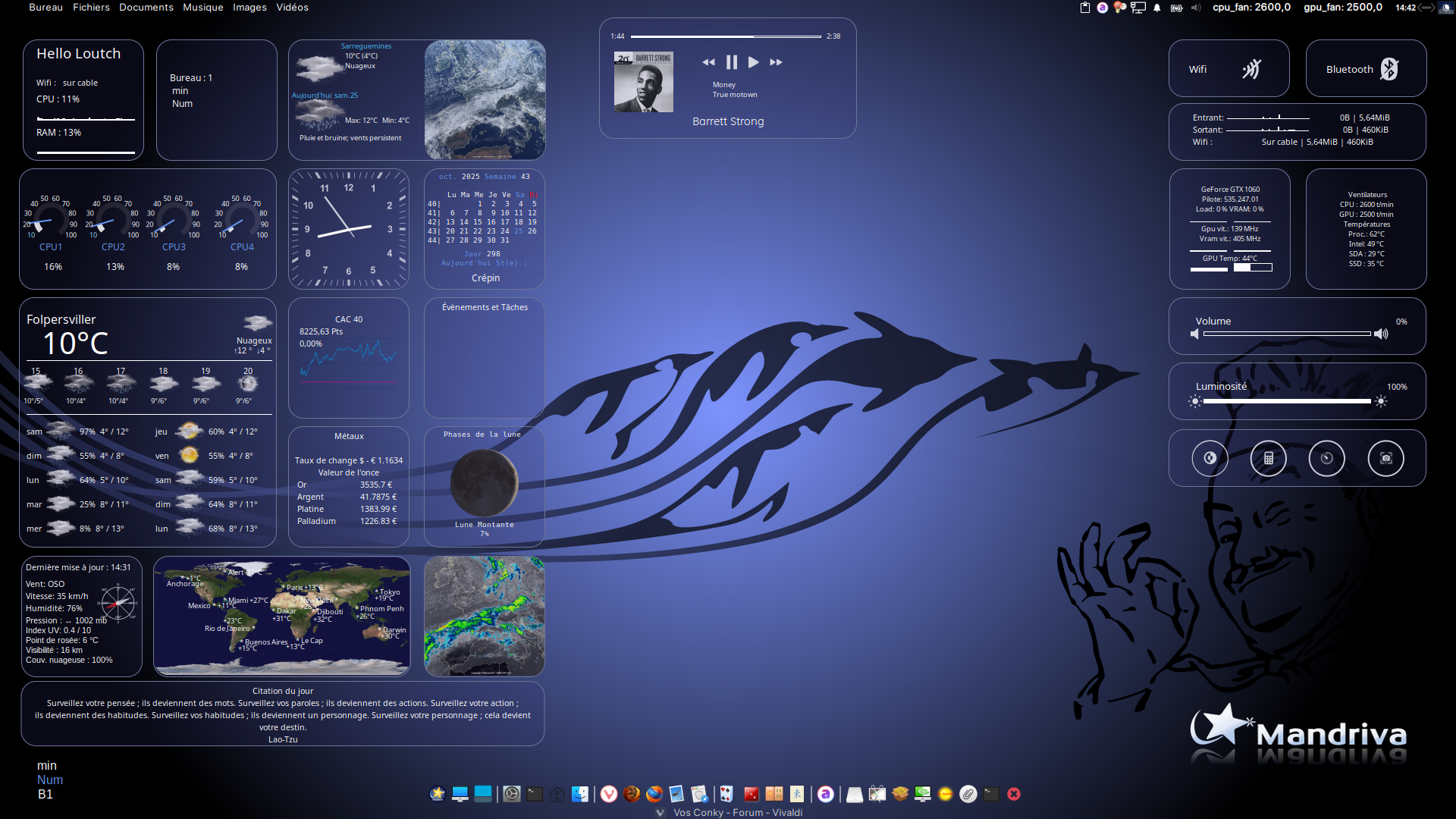
@+
Linuxmint 24.02 Xia - Mageia 9 xfce et plasma sur ssd sur HP Pavilion g7
Xubuntu 18.04 LTS et 24.04 en xfce sur ASUS Rog STRIX
Xubuntu 18.04 LTS et 24.04 en xfce sur ASUS Rog STRIX

gerard-ll Membre non connecté
-
- Voir le profil du membre gerard-ll
- Inscrit le : 09/12/2011
- Groupes :
loutch :La dernière version en cours
Ah c'est très joli loutch!
Faudrait presque ne pas mettre de fenêtre devant

Et tu disais l'autre jour que ça ne prenait pas beaucoup de ressources alors tout ça à l'écran?
Pal mal Mageia!
@+
Gérard
@+
Gérard
loutch Membre non connecté
-
- Voir le profil du membre loutch
- Inscrit le : 07/07/2010
- Groupes :
Merci .
Non chez moi une moyenne de 6% @ l'instant
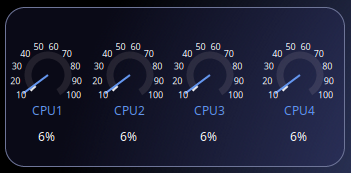
@+
Linuxmint 24.02 Xia - Mageia 9 xfce et plasma sur ssd sur HP Pavilion g7
Xubuntu 18.04 LTS et 24.04 en xfce sur ASUS Rog STRIX
Xubuntu 18.04 LTS et 24.04 en xfce sur ASUS Rog STRIX
loutch Membre non connecté
-
- Voir le profil du membre loutch
- Inscrit le : 07/07/2010
- Groupes :
Attention conky créé sur une ubuntu xfce , spotify n'a pas de rpm
Conky-spotify
Conkyrc
Code :
conky.config = {
-- — Conky settings — #
    background = true,
    update_interval = 1,
    total_run_times = 0,
    net_avg_samples = 2,
    cpu_avg_samples = 1,
    no_buffers = true,
    imlib_cache_size = 0,

    top_cpu_separate = false,

--    draw_shades = true,
    draw_graph_borders = true,
--draw_borders = true,
    draw_outline = false,
-- — Window specifications — #
    own_window = true,
    own_window_type = normal,
        own_window_transparent = false,
    own_window_hints = 'undecorated,skip_taskbar,skip_pager,below',
    own_window_argb_visual = true,
    own_window_argb_value = 00,   -- 60
    own_window_colour = '000000',
    double_buffer = true,

    minimum_width = 260,
maximum_width = 260, minimum_height = 240,
    alignment = 'top_right',

    border_inner_margin = 10,
    gap_x = 35,
    gap_y = 835,
-- — Text settings — #
    use_xft = true,
    font = 'Ubuntu:size=8',
    override_utf8_locale = true,
    default_color = '#FFFFFF',
    color0 = '#ff0000',
    color1 = '#AEEEEE',
    color2 = '#6495ee',
    color3 = '#0ab1ff', -- Light Blue
    color4 = '#4682B4', -- Steel Blue
    color5 = '#9FB6CD', -- Slate Grey
    color6 = '#000000', -- Black
    color7 = '#888888', -- Grey
    default_bar_width=100,
    default_bar_height=2,
lua_load = '~/.conky/lua/image.lua',

};
conky.text = [[${exec ~/.conky/conky-spotify/scripts/cover.sh}${voffset -20}
        ${alignc}${color3}SPOTIFY $color
    ${alignc}${exec ~/.conky/conky-spotify/scripts/artist.sh}${exec ~/.conky/conky-spotify/scripts/title.sh > ~/.conky/conky-spotify/titre}
        ${alignc}${if_match "${exec sed -n '1p' ~/.conky/conky-spotify/titre}" == "Advertisement"}Publicité ${else}${exec ~/.conky/conky-spotify/scripts/title.sh}${endif}
    ${alignc}${exec ~/.conky/conky-spotify/scripts/position.sh}   ${execbar 2,160 ~/.conky/conky-spotify/scripts/marens_bare.sh}   $color3}${exec ~/.conky/conky-spotify/scripts/duree.sh}
    ${if_match "${execi 2 sed -n '1p' $HOME/.conky/conky-spotify/current/current.txt}" == ""}${lua fDrawImage ~/.conky/conky-spotify/pub.png 50 65 180 180}${else}${lua fDrawImage ~/.conky/conky-spotify/current/current.png 50 65 180 180}${endif}
    ${voffset 170}$color
${hr 1}
${voffset -200}
]];
cover.sh
Code :
#!/bin/bash
id_current=$(cat ~/.conky/conky-spotify/current/current.txt)
id_new=`~/.conky/conky-spotify/scripts/id.sh`
cover=
imgurl=
dbus=`busctl --user list | grep "spotify"`
if [ "$dbus" == "" ]; then
       `cp ~/.conky/conky-spotify/empty.png ~/.conky/conky-spotify/current/current.jpg`
    echo "" > ~/.conky/conky-spotify/current/current.txt
else
    if [ "$id_new" != "$id_current" ]; then
        echo $id_new > ~/.conky/conky-spotify/current/current.txt
        imgname=`cat ~/.conky/conky-spotify/current/current.txt | cut -d '/' -f5`
        cover=`ls ~/.conky/conky-spotify/covers | grep "$id_new"`
        if grep -q "${imgname}" <<< "$cover"
        then
            `cp ~/.conky/conky-spotify/covers/$imgname.jpg ~/.conky/conky-spotify/current/current.jpg`
        else
            imgurl=`~/.conky/conky-spotify/scripts/imgurl.sh`
            `wget -q -O ~/.conky/conky-spotify/covers/$imgname.jpg $imgurl &> /dev/null`
            `touch ~/.conky/conky-spotify/covers/$imgname.jpg`
            `cp ~/.conky/conky-spotify/covers/$imgname.jpg ~/.conky/conky-spotify/current/current.jpg`
                 `convert ~/.conky/conky-spotify/current/current.jpg ~/.conky/conky-spotify/current/current.png`
            # clean up covers folder, keeping only the latest X amount, in below example it is 10

            rm -f `ls -t ~/.conky/conky-spotify/covers/* | awk 'NR>10'`
            rm -f wget-log #wget-logs are accumulated otherwise
        fi
    fi
fi
artist.sh
Code :
#!/bin/bash

artist=`dbus-send --print-reply --dest=org.mpris.MediaPlayer2.spotify /org/mpris/MediaPlayer2 org.freedesktop.DBus.Properties.Get string:'org.mpris.MediaPlayer2.Player' string:'Metadata'|grep -E -A 2 "artist"|grep -E -v "artist"|grep -E -v "array"|cut -b 27-|cut -d '"' -f 1|grep -E -v ^$`
echo $artist
title.sh
Code :
#!/bin/bash
title=`dbus-send --print-reply --dest=org.mpris.MediaPlayer2.spotify /org/mpris/MediaPlayer2 org.freedesktop.DBus.Properties.Get string:'org.mpris.MediaPlayer2.Player' string:'Metadata'|grep -E -A 1 "title"|grep -E -v "title"|cut -b 44-|cut -d '"' -f 1|grep -E -v ^$`
echo $title
album.sh
Code :
#!/bin/bash

album=`dbus-send --print-reply --dest=org.mpris.MediaPlayer2.spotify /org/mpris/MediaPlayer2 org.freedesktop.DBus.Properties.Get string:'org.mpris.MediaPlayer2.Player' string:'Metadata'|grep -E -A 1 "album"|grep -E "^\s*variant"|cut -b 44-|grep -E -v ^$|sed 's/"$//'`
echo $album
id.sh
Code :
#!/bin/bash
id=`dbus-send --print-reply --session --dest=org.mpris.MediaPlayer2.spotify /org/mpris/MediaPlayer2 org.freedesktop.DBus.Properties.Get string:'org.mpris.MediaPlayer2.Player' string:'Metadata' | grep spotify/track | cut -d '"' -f2`
echo $id
imgurl.sh
Code :
#!/bin/bash
imgurl=`dbus-send --print-reply --dest=org.mpris.MediaPlayer2.spotify /org/mpris/MediaPlayer2 org.freedesktop.DBus.Properties.Get string:'org.mpris.MediaPlayer2.Player' string:'Metadata' | grep -E -A 0 "image" | cut -d '"' -f2`
echo $imgurl
duree.sh
Code :
#!/bin/bash
convertsec()
    {
        x=`expr $1 / 1000000`
        s=`expr $x % 60`
        x=`expr $x / 60`
        m=`expr $x % 60`
        printf "%02d:%02d\n" $m $s
    }
    POS=$(qdbus org.mpris.MediaPlayer2.spotify /org/mpris/MediaPlayer2 org.freedesktop.DBus.Properties.Get org.mpris.MediaPlayer2.Player Position)
    TOTAL=$(qdbus org.mpris.MediaPlayer2.spotify /org/mpris/MediaPlayer2 org.freedesktop.DBus.Properties.Get org.mpris.MediaPlayer2.Player Metadata | grep "^mpris:length" | awk '{print $2}')
        if [ -z $TOTAL ]
        then
            positionTime="00:00"
            lengthTime="00:00"
            length="stopped"
            position=1
        else
            positionTime=$(convertsec $POS)
            lengthTime=$(convertsec $TOTAL)
            length=$(($TOTAL/1000000))
            position=$(($POS/1000000))
        fi
vol=$(qdbus org.mpris.MediaPlayer2.spotify /org/mpris/MediaPlayer2 org.freedesktop.DBus.Properties.Get org.mpris.MediaPlayer2.Player Volume)
#    echo $length
#    echo $position
#  echo $positionTime
    echo $lengthTime
position.sh
Code :
#!/bin/bash
convertsec()
    {
        x=`expr $1 / 1000000`
        s=`expr $x % 60`
        x=`expr $x / 60`
        m=`expr $x % 60`
        printf "%02d:%02d\n" $m $s
    }
    POS=$(qdbus org.mpris.MediaPlayer2.spotify /org/mpris/MediaPlayer2 org.freedesktop.DBus.Properties.Get org.mpris.MediaPlayer2.Player Position)
    TOTAL=$(qdbus org.mpris.MediaPlayer2.spotify /org/mpris/MediaPlayer2 org.freedesktop.DBus.Properties.Get org.mpris.MediaPlayer2.Player Metadata | grep "^mpris:length" | awk '{print $2}')
        if [ -z $TOTAL ]
        then
            positionTime="00:00"
            lengthTime="00:00"
            length="stopped"
            position=1
        else
            positionTime=$(convertsec $POS)
            lengthTime=$(convertsec $TOTAL)
            length=$(($TOTAL/1000000))
            position=$(($POS/1000000))
        fi
vol=$(qdbus org.mpris.MediaPlayer2.spotify /org/mpris/MediaPlayer2 org.freedesktop.DBus.Properties.Get org.mpris.MediaPlayer2.Player Volume)
#    echo $length
#    echo $position
   echo $positionTime
marens_bare.sh
Code :
#!/bin/bash
total=$(qdbus org.mpris.MediaPlayer2.spotify /org/mpris/MediaPlayer2 org.freedesktop.DBus.Properties.Get org.mpris.MediaPlayer2.Player Metadata | grep "^mpris:length" | awk '{print $2}')
if [[ "$total" != "0" ]]; then
     percentage=$(echo "scale=1;$(qdbus org.mpris.MediaPlayer2.spotify /org/mpris/MediaPlayer2 org.freedesktop.DBus.Properties.Get org.mpris.MediaPlayer2.Player Position)*100/$(qdbus org.mpris.MediaPlayer2.spotify /org/mpris/MediaPlayer2 org.freedesktop.DBus.Properties.Get org.mpris.MediaPlayer2.Player Metadata | grep "^mpris:length" | awk '{print $2}') + 0.5" | bc | awk '{print int($1)}')
     echo $percentage

   else

     echo '0.05'

fi
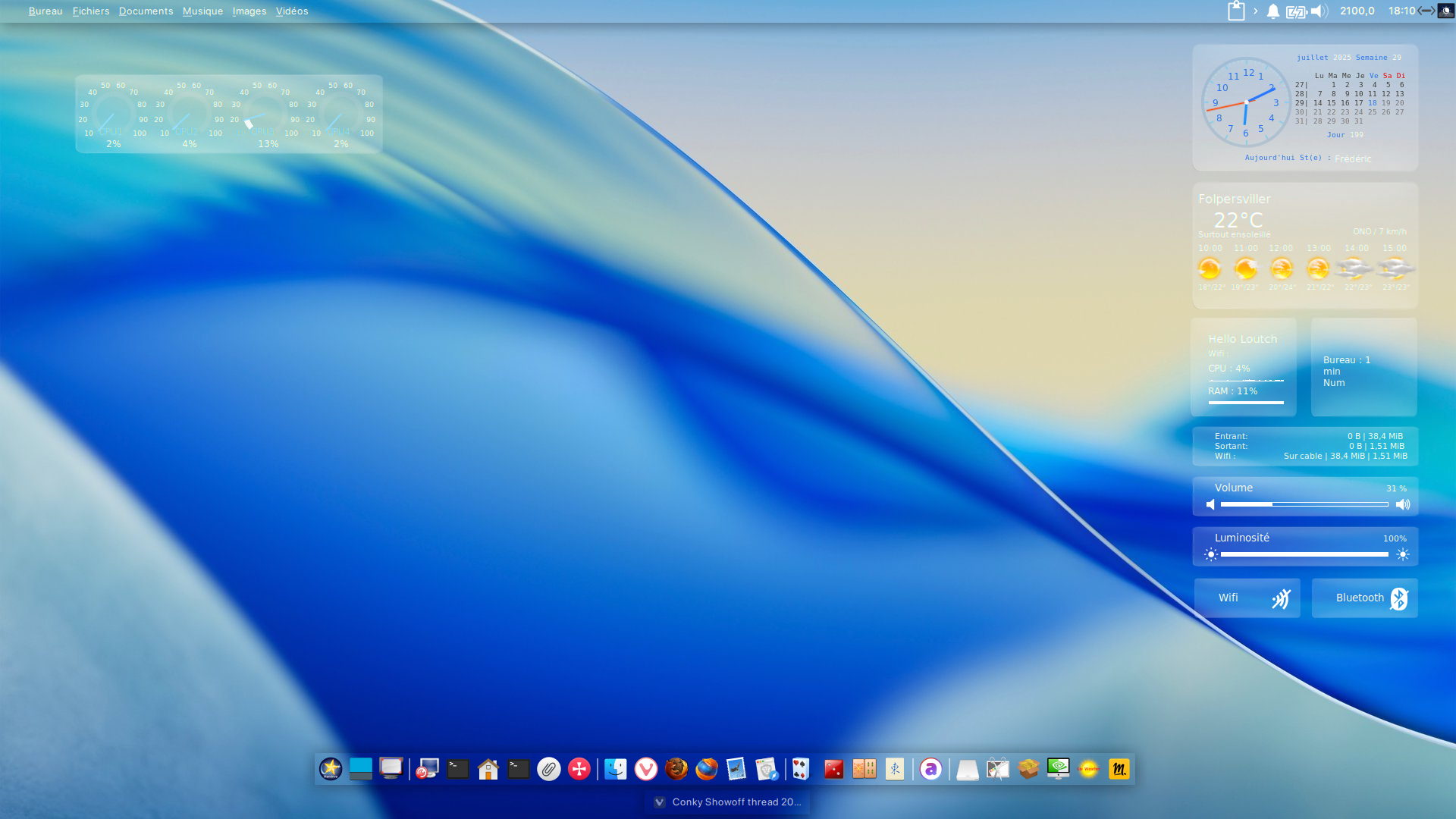
Tout ce beau monde donne ceci .
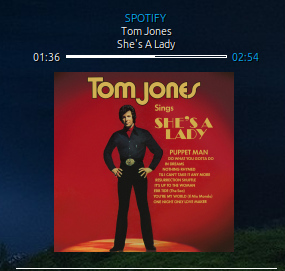
en grand.
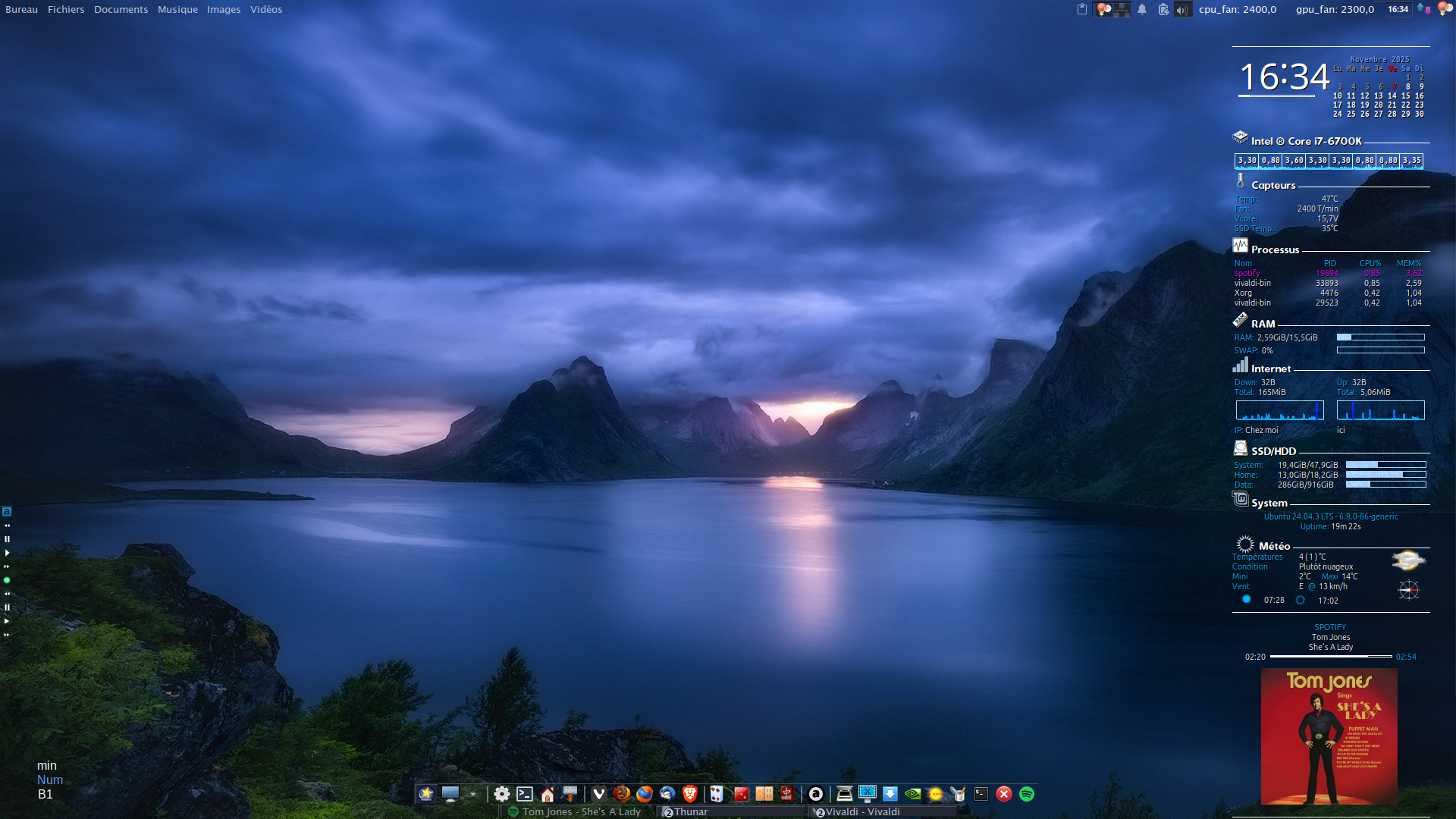
@+
Édité par loutch Le 10/11/2025 à 17h44
Linuxmint 24.02 Xia - Mageia 9 xfce et plasma sur ssd sur HP Pavilion g7
Xubuntu 18.04 LTS et 24.04 en xfce sur ASUS Rog STRIX
Xubuntu 18.04 LTS et 24.04 en xfce sur ASUS Rog STRIX
Ami age Membre non connecté
-
- Voir le profil du membre Ami age
- Inscrit le : 18/08/2012
- Site internet
- Groupes :
-
Modérateur

ça peut donner envie à du monde,
Ca serait bien de mettre un tuto dans le premier post du sujet.
Comment installer un Conky sur mageia
_______________________________________________________________________
___________________________________ Un petit clic pour Mageia ? =>> CLIQUEZ I C I :
.
___________________________________ Un petit clic pour Mageia ? =>> CLIQUEZ I C I :
.
loutch Membre non connecté
-
- Voir le profil du membre loutch
- Inscrit le : 07/07/2010
- Groupes :
Tout est indiqué dans le wiki il me semble .
@+
Linuxmint 24.02 Xia - Mageia 9 xfce et plasma sur ssd sur HP Pavilion g7
Xubuntu 18.04 LTS et 24.04 en xfce sur ASUS Rog STRIX
Xubuntu 18.04 LTS et 24.04 en xfce sur ASUS Rog STRIX
Ami age Membre non connecté
-
- Voir le profil du membre Ami age
- Inscrit le : 18/08/2012
- Site internet
- Groupes :
-
Modérateur
_______________________________________________________________________
___________________________________ Un petit clic pour Mageia ? =>> CLIQUEZ I C I :
.
___________________________________ Un petit clic pour Mageia ? =>> CLIQUEZ I C I :
.
loutch Membre non connecté
-
- Voir le profil du membre loutch
- Inscrit le : 07/07/2010
- Groupes :
@ Ami age
Modification effectuée .
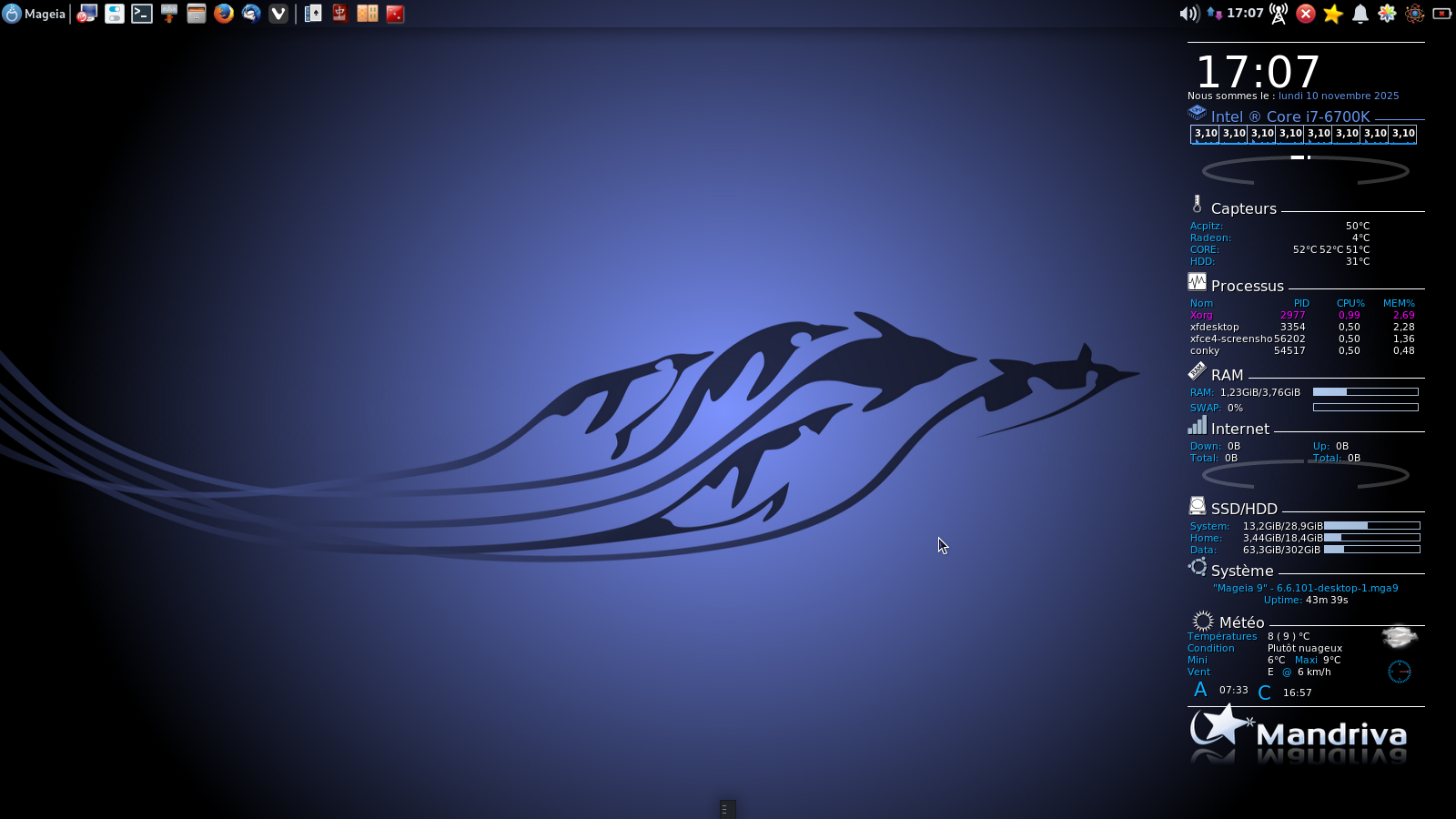
Conky sur Mageia9 xfce
conkyrc
Code :
conky.config = {
-- — Conky settings — #

    background = true,
    update_interval = 1,
    total_run_times = 0,
    net_avg_samples = 2,
    cpu_avg_samples = 2,
    no_buffers = true,
    imlib_cache_size = 0,

    top_cpu_separate = false,

--    draw_shades = true,
    draw_graph_borders = true,
-- draw_borders = true,
    draw_outline = false,

-- — Window specifications — #

    own_window = true,
    own_window_type = normal,
        own_window_transparent = false,
    own_window_hints = 'undecorated,skip_taskbar,skip_pager,below',
    own_window_argb_visual = true,
    own_window_argb_value = 00,   -- 60
    own_window_colour = '000000',
    double_buffer = true,

    minimum_width = 260,
maximum_width = 260, minimum_height = 755,
    alignment = 'top_right',

    border_inner_margin = 10,

    gap_x = 35,
    gap_y = 00,

-- — Text settings — #
    use_xft = true,
    font = 'Ubuntu:size=8',
    override_utf8_locale = true,

    default_color = '#FFFFFF',
    color0 = '#ff0000',
    color1 = '#AEEEEE',
    color2 = '#6495ee',
    color3 = '#0ab1ff', -- Light Blue
    color4 = '#4682B4', -- Steel Blue
    color5 = '#9FB6CD', -- Slate Grey
    color6 = '#000000', -- Black
    color7 = '#888888', -- Grey

    default_bar_width=100,
    default_bar_height=2,

-- lua_load = '~/.conky/lua/image.lua',

lua_load = '~/Bleys/loaderbleu.lua',
    lua_draw_hook_pre = 'loader_lua',

};
conky.text = [[${execi 3600 bash $HOME/Accuweather_conky_script/accuweather -f2015}${voffset -30}
${hr 1}
${font :size=36}${goto 20}${color}${time %H}:${time %M}${font}
Nous sommes le : ${color2}${time %A} ${time %d} ${time %B} ${time %Y}
${font ConkySymbols:size=16}f${font Dyuthi:pixelsize=16} Intel ® Core i7-6700K ${hr 1}${font}${voffset -4}
${goto 15}$color5${cpugraph cpu1 20,31 009bf9 ff0000 -t}${cpugraph cpu2 20,31 009bf9 ff0000 -t}${cpugraph cpu1 20,31 009bf9 ff0000 -t}${cpugraph cpu2 20,31 009bf9 ff0000 -t}${cpugraph cpu1 20,31 009bf9 ff0000 -t}${cpugraph cpu2 20,31 009bf9 ff0000 -t}${cpugraph cpu1 20,31 009bf9 ff0000 -t}${cpugraph cpu2 20,31 009bf9 ff0000 -t}
${voffset -26}${font Ubuntu Mono:bold:pixelsize=10}${goto 20}$color${freq_g 1}${goto 51}${freq_g 2}${goto 82}${freq_g 1}${goto 113}${freq_g 2}${goto 144}${freq_g 1}${goto 175}${freq_g 2}${goto 206}${freq_g 1}${goto 237}${freq_g 2}
${voffset 50}$color${font ConkySymbols:size=16}h${font Dyuthi:pixelsize=16} Capteurs ${hr 1}${font}${voffset 4}
${color3}${goto 15}Acpitz:  $color${alignr 60}${hwmon 1 temp 1input}°C
${color3}${goto 15}Radeon:  $color${alignr 60}4°C
${color3}${goto 15}CORE:    $color${alignr 60}${hwmon 4 temp 1input}°C ${hwmon 4 temp 2input}°C ${hwmon 4 temp 3input}°C
${color3}${goto 15}HDD:     $color${alignr 60}${execi 120 hddtemp -n /dev/sda}°C${voffset 4}
${font ConkySymbols:size=16}n${font Dyuthi:pixelsize=16} Processus ${hr 1}${font}${voffset 4}
${goto 15}${color3}Nom${alignr 60}PID${alignr 30}CPU%${alignr 10}MEM%
${goto 15}${color magenta}${top name 1}${alignr 70}${top pid 1}${alignr 40}${top cpu 1}${alignr 10}${top mem 1}
${goto 15}$color${top name 2}${alignr 70}${top pid 2}${alignr 40}${top cpu 2}${alignr 10}${top mem 2}
${goto 15}$color${top name 3}${alignr 70}${top pid 3}${alignr 40}${top cpu 3}${alignr 10}${top mem 3}
${goto 15}$color${top name 4}${alignr 70}${top pid 4}${alignr 40}${top cpu 4}${alignr 10}${top mem 4}${voffset 4}
${font ConkySymbols:size=16}J${font Dyuthi:pixelsize=16} RAM ${hr 1}${font}${voffset 4}
$color3${font}${goto 15}RAM: $color $mem/$memmax ${goto 150}$color5${membar 8,115}${voffset 4}
$color3${font}${goto 15}SWAP: $color $swapperc% ${goto 150}$color5${swapbar 8,115}
${font ConkySymbols:size=16}b${font Dyuthi:pixelsize=16}${color} Internet ${hr 1}${font}${voffset 4}
$color3${goto 15}Down:$color  ${downspeed eno1} $color3${goto 150}Up:$color  ${upspeed eno1}
$color3${goto 15}Total:$color  ${totaldown eno1} ${color lightgrey} ${goto 150}${color3}Total:$color  ${totalup eno1}
${voffset 20}
${font ConkySymbols:size=16}k${font Dyuthi:pixelsize=16} SSD/HDD ${hr 1}${font}${voffset 4}
$color3${goto 15}System:$color${goto 70} ${fs_used /}/${fs_size /} ${goto 162}$color5${fs_bar 8,105 /}
$color3${goto 15}Home:$color  ${goto 70} ${fs_used /home}/${fs_size /home} ${goto 162}$color5${fs_bar 8,105 /home}
$color3${goto 15}Data:$color  ${goto 70} ${fs_used /data/}/${fs_size /data/}${goto 162}${color5}${fs_bar 8,105 /data/}
${font ConkySymbols:size=16}O$color${font Dyuthi:pixelsize=16} Système ${hr 1}${font}${voffset 4}
$color3${alignc}${execi 3600 lsb_release -ds} - $kernel
${alignc}Uptime: ${color}${uptime_short}
${font Conkyweather:size=26}a$color${font Dyuthi:pixelsize=16}${voffset -10}Météo ${hr 1}${font}
${color3}Températures $color ${goto 100}${execi 600 sed -n '2p' $HOME/Accuweather_conky_script/curr_cond} ( ${execi 600 sed -n '3p' $HOME/Accuweather_conky_script/curr_cond} ) °C
${color3}Condition    $color ${goto 100}${execi 600 sed -n '1p' $HOME/Accuweather_conky_script/forecast_fr}
${color3}Mini         $color ${goto 100}${execi 600 sed -n '5p'  $HOME/Accuweather_conky_script/daily_forecast}°C ${color3} ${goto 130}Maxi $color ${execi 600 sed -n '4p'  $HOME/Accuweather_conky_script/daily_forecast}°C
${color3}Vent         $color ${goto 100}${execi 600 sed -n '5p' $HOME/Accuweather_conky_script/curr_cond}  ${color3} @ $color ${execi 600 sed -n '6p' $HOME/Accuweather_conky_script/curr_cond}
${color3}${font weather :size=16} A $font $color ${voffset -3}${execi 600 sed -n '23p' $HOME/Accuweather_conky_script/curr_cond} ${voffset -3}${color3}${font weather :size=16} C $font $color ${voffset -4}${execi 600 sed -n '24p' $HOME/Accuweather_conky_script/curr_cond}
${hr 1}${voffset -200}

${lua fDrawImage $HOME/Accuweather_conky_script/forecast_2015/forecast_0.png 215 640 58 35}
${lua fDrawImage $HOME/Accuweather_conky_script/vents/compas1.png            230 680 30 30}
${lua fDrawImage $HOME/Accuweather_conky_script/Wind1.png                    230 680 30 30}
]];
@+
Linuxmint 24.02 Xia - Mageia 9 xfce et plasma sur ssd sur HP Pavilion g7
Xubuntu 18.04 LTS et 24.04 en xfce sur ASUS Rog STRIX
Xubuntu 18.04 LTS et 24.04 en xfce sur ASUS Rog STRIX
Ami age Membre non connecté
-
- Voir le profil du membre Ami age
- Inscrit le : 18/08/2012
- Site internet
- Groupes :
-
Modérateur
_______________________________________________________________________
___________________________________ Un petit clic pour Mageia ? =>> CLIQUEZ I C I :
.
___________________________________ Un petit clic pour Mageia ? =>> CLIQUEZ I C I :
.
loutch Membre non connecté
-
- Voir le profil du membre loutch
- Inscrit le : 07/07/2010
- Groupes :
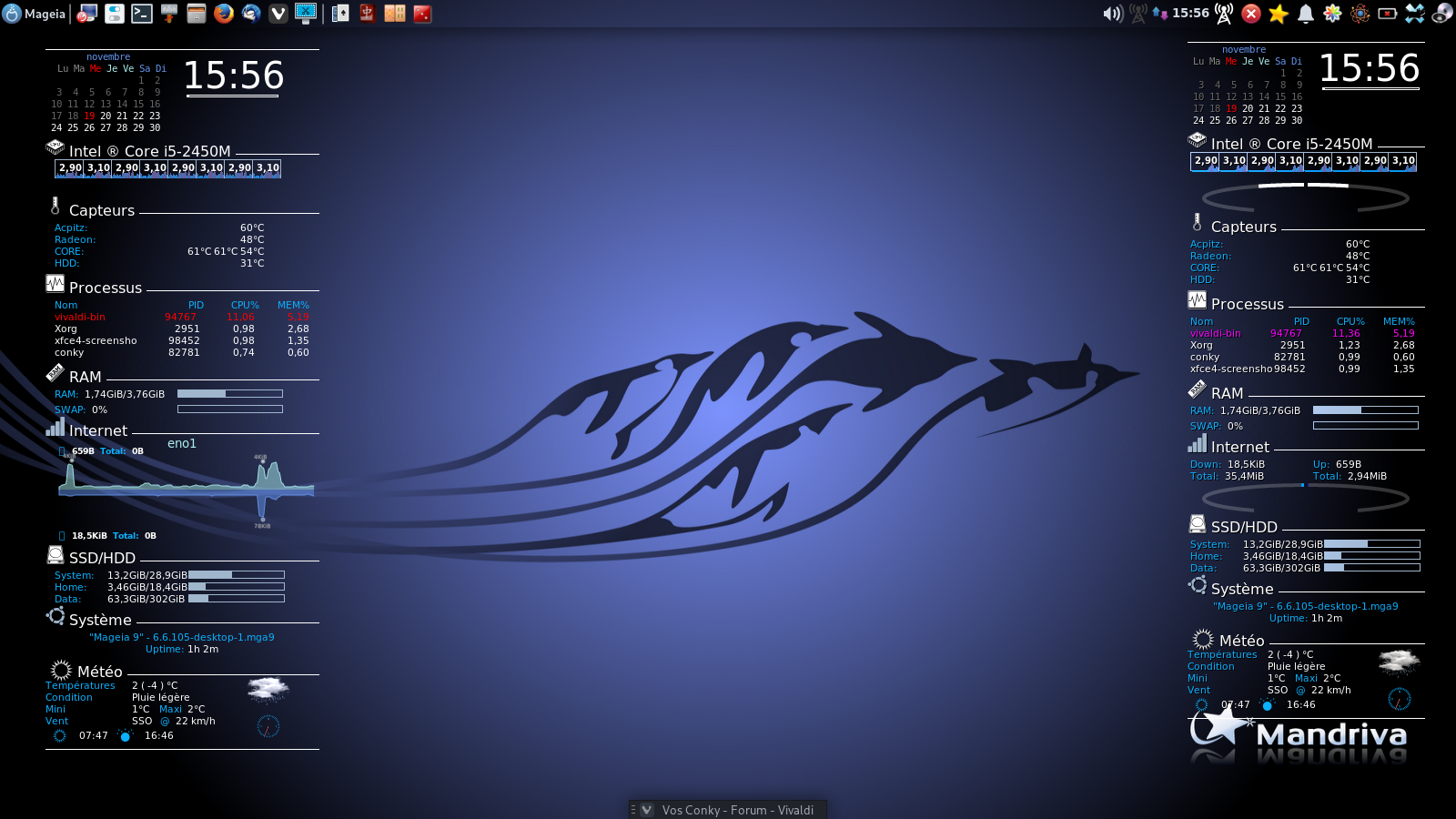
Sur Mageia 9
Rajout d'un calendrier qui fonctionne comme sur les Ubuntu
Code :
conky.config = {
-- — Conky settings — #

    background = true,
    update_interval = 1,
    total_run_times = 0,
    net_avg_samples = 2,
    cpu_avg_samples = 2,
    no_buffers = true,
    imlib_cache_size = 0,

    top_cpu_separate = false,

--    draw_shades = true,
    draw_graph_borders = true,
-- draw_borders = true,
    draw_outline = false,

-- — Window specifications — #

    own_window = true,
    own_window_type = normal,
        own_window_transparent = false,
    own_window_hints = 'undecorated,skip_taskbar,skip_pager,below',
    own_window_argb_visual = true,
    own_window_argb_value = 00,   -- 60
    own_window_colour = '000000',
    double_buffer = true,

    minimum_width = 260,
maximum_width = 260, minimum_height = 755,
    alignment = 'top_right',

    border_inner_margin = 10,

    gap_x = 35,
    gap_y = 00,

-- — Text settings — #
    use_xft = true,
    font = 'Ubuntu:size=8',
    override_utf8_locale = true,

    default_color = '#FFFFFF',
    color0 = '#ff0000',
    color1 = '#AEEEEE',
    color2 = '#6495ee',
    color3 = '#0ab1ff', -- Light Blue
    color4 = '#4682B4', -- Steel Blue
    color5 = '#9FB6CD', -- Slate Grey
    color6 = '#000000', -- Black
    color7 = '#888888', -- Grey

    default_bar_width=106,
    default_bar_height=2,

-- lua_load = '~/.conky/lua/image.lua',

lua_load = '~/Bleys/loaderbleu.lua',
    lua_draw_hook_pre = 'loader_lua',

};
conky.text = [[${execi 3600 bash $HOME/Accuweather_conky_script/accuweather -f2015}${voffset -30}
${hr 1}
${font :size=30}${goto 155}${color}${time %H}:${time %M}${font}
${goto 160}${execbar date +%S | awk -F: '{ print int(100/60*$1) }'}
${voffset -70}
${font DejaVu Sans Mono :size=8}${goto 50}${color2}${time %B}${color1}
${goto 18}${if_match ${time %u}==1}${color0}Lu${color1} Ma Me Je Ve ${color2}Sa Di ${else}\
${if_match ${time %u}==2}${color7}Lu ${color0}Ma${color1} Me Je Ve ${color2}Sa Di${else}\
${if_match ${time %u}==3}${color7}Lu Ma ${color0}Me${color1} Je Ve ${color2}Sa Di${else}\
${if_match ${time %u}==4}${color7}Lu Ma Me ${color0}Je${color1} Ve ${color2}Sa Di${else}\
${if_match ${time %u}==5}${color7}Lu Ma Me Je ${color0}Ve${color2} Sa Di${else}\
${if_match ${time %u}==6}${color7}Lu Ma Me Je Ve ${color0}Sa${color2} Di${else}\
${if_match ${time %u}==7}${color7}Lu Ma Me Je Ve Sa ${color2}Di${color1}${else}
${endif}${endif}${endif}${endif}${endif}${endif}${endif}${color}
${font DejaVu Sans Mono :size=8}${color 666666}${execpi 60 DJS=`date +%_d`; cal -m | sed '1,2d' | sed '/./!d' | sed 's/$/                   /' | fold -w 21 | sed -n '/^.\{21\}/p' | sed 's/^/ /' | sed /" $DJS "/s/" $DJS "/" "'${color red}'"$DJS"'${color}'" "/}
${voffset -10}${font ConkySymbols:size=16}f${font Dyuthi:pixelsize=16} Intel ® Core i5-2450M ${hr 1}${font}${voffset -4}
${goto 15}$color5${cpugraph cpu1 20,31 009bf9 ff0000 -t}${cpugraph cpu2 20,31 009bf9 ff0000 -t}${cpugraph cpu1 20,31 009bf9 ff0000 -t}${cpugraph cpu2 20,31 009bf9 ff0000 -t}${cpugraph cpu1 20,31 009bf9 ff0000 -t}${cpugraph cpu2 20,31 009bf9 ff0000 -t}${cpugraph cpu1 20,31 009bf9 ff0000 -t}${cpugraph cpu2 20,31 009bf9 ff0000 -t}
${voffset -26}${font Ubuntu Mono:bold:pixelsize=10}${goto 20}$color${freq_g 1}${goto 51}${freq_g 2}${goto 82}${freq_g 1}${goto 113}${freq_g 2}${goto 144}${freq_g 1}${goto 175}${freq_g 2}${goto 206}${freq_g 1}${goto 237}${freq_g 2}
${voffset 50}$color${font ConkySymbols:size=16}h${font Dyuthi:pixelsize=16} Capteurs ${hr 1}${font}${voffset 4}
${color3}${goto 15}Acpitz:  $color${alignr 60}${hwmon 1 temp 1input}°C
${color3}${goto 15}Radeon:  $color${alignr 60}4°C
${color3}${goto 15}CORE:    $color${alignr 60}${hwmon 4 temp 1input}°C ${hwmon 4 temp 2input}°C ${hwmon 4 temp 3input}°C
${color3}${goto 15}HDD:     $color${alignr 60}${execi 120 hddtemp -n /dev/sda}°C${voffset 4}
${font ConkySymbols:size=16}n${font Dyuthi:pixelsize=16} Processus ${hr 1}${font}${voffset 4}
${goto 15}${color3}Nom${alignr 60}PID${alignr 30}CPU%${alignr 10}MEM%
${goto 15}${color magenta}${top name 1}${alignr 70}${top pid 1}${alignr 40}${top cpu 1}${alignr 10}${top mem 1}
${goto 15}$color${top name 2}${alignr 70}${top pid 2}${alignr 40}${top cpu 2}${alignr 10}${top mem 2}
${goto 15}$color${top name 3}${alignr 70}${top pid 3}${alignr 40}${top cpu 3}${alignr 10}${top mem 3}
${goto 15}$color${top name 4}${alignr 70}${top pid 4}${alignr 40}${top cpu 4}${alignr 10}${top mem 4}${voffset 4}
${font ConkySymbols:size=16}J${font Dyuthi:pixelsize=16} RAM ${hr 1}${font}${voffset 4}
$color3${font}${goto 15}RAM: $color $mem/$memmax ${goto 150}$color5${membar 8,115}${voffset 4}
$color3${font}${goto 15}SWAP: $color $swapperc% ${goto 150}$color5${swapbar 8,115}
${font ConkySymbols:size=16}b${font Dyuthi:pixelsize=16}${color} Internet ${hr 1}${font}${voffset 4}
$color3${goto 15}Down:$color  ${downspeed eno1} $color3${goto 150}Up:$color  ${upspeed eno1}
$color3${goto 15}Total:$color  ${totaldown eno1} ${color lightgrey} ${goto 150}${color3}Total:$color  ${totalup eno1}
${voffset 20}
${font ConkySymbols:size=16}k${font Dyuthi:pixelsize=16} SSD/HDD ${hr 1}${font}${voffset 4}
$color3${goto 15}System:$color${goto 70} ${fs_used /}/${fs_size /} ${goto 162}$color5${fs_bar 8,105 /}
$color3${goto 15}Home:$color  ${goto 70} ${fs_used /home}/${fs_size /home} ${goto 162}$color5${fs_bar 8,105 /home}
$color3${goto 15}Data:$color  ${goto 70} ${fs_used /data/}/${fs_size /data/}${goto 162}${color5}${fs_bar 8,105 /data/}
${font ConkySymbols:size=16}O$color${font Dyuthi:pixelsize=16} Système ${hr 1}${font}${voffset 4}
$color3${alignc}${execi 3600 lsb_release -ds} - $kernel
${alignc}Uptime: ${color}${uptime_short}
${font Conkyweather:size=26}a$color${font Dyuthi:pixelsize=16}${voffset -10}Météo ${hr 1}${font}
${color3}Températures $color ${goto 100}${execi 600 sed -n '2p' $HOME/Accuweather_conky_script/curr_cond} ( ${execi 600 sed -n '3p' $HOME/Accuweather_conky_script/curr_cond} ) °C
${color3}Condition    $color ${goto 100}${execi 600 sed -n '1p' $HOME/Accuweather_conky_script/forecast_fr}
${color3}Mini         $color ${goto 100}${execi 600 sed -n '5p'  $HOME/Accuweather_conky_script/daily_forecast}°C ${color3} ${goto 130}Maxi $color ${execi 600 sed -n '4p'  $HOME/Accuweather_conky_script/daily_forecast}°C
${color3}Vent         $color ${goto 100}${execi 600 sed -n '5p' $HOME/Accuweather_conky_script/curr_cond}  ${color3} @ $color ${execi 600 sed -n '6p' $HOME/Accuweather_conky_script/curr_cond}
${color3}${font conkyweather :size=16} a $font $color ${voffset -8}${execi 600 sed -n '23p' $HOME/Accuweather_conky_script/curr_cond} ${voffset -2}${color3}${font conkyweather :size=16} A $font $color ${voffset -9}${execi 600 sed -n '24p' $HOME/Accuweather_conky_script/curr_cond}
${hr 1}${voffset -200}

${lua fDrawImage $HOME/Accuweather_conky_script/forecast_2015/forecast_0.png 215 670 58 35}
${lua fDrawImage $HOME/Accuweather_conky_script/Wind1.png                    230 710 30 30}
]];

Linuxmint 24.02 Xia - Mageia 9 xfce et plasma sur ssd sur HP Pavilion g7
Xubuntu 18.04 LTS et 24.04 en xfce sur ASUS Rog STRIX
Xubuntu 18.04 LTS et 24.04 en xfce sur ASUS Rog STRIX
loutch Membre non connecté
-
- Voir le profil du membre loutch
- Inscrit le : 07/07/2010
- Groupes :
Mageia 9 xfce
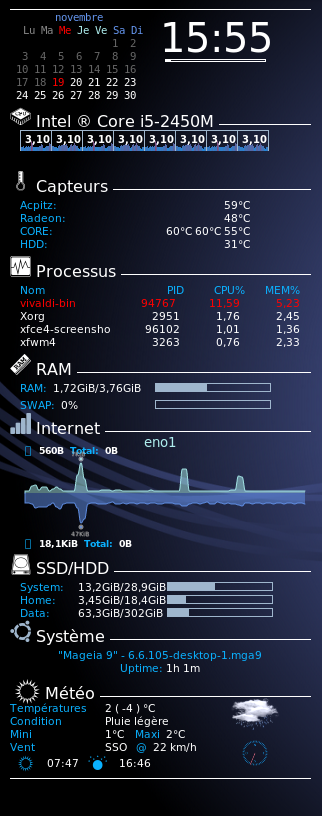
les deux versions
@+
Linuxmint 24.02 Xia - Mageia 9 xfce et plasma sur ssd sur HP Pavilion g7
Xubuntu 18.04 LTS et 24.04 en xfce sur ASUS Rog STRIX
Xubuntu 18.04 LTS et 24.04 en xfce sur ASUS Rog STRIX
Répondre
Vous n'êtes pas autorisé à écrire dans cette catégorie